Payroll
Forecast wage costs ahead of a National Minimum Wage rise, then export the actual pay run to your payroll software.
Payroll in SalonLogic Pro
SalonLogic doesn't run payroll itself — it forecasts what your wage costs will look like, and exports the figures your payroll software needs to actually pay people. Full payroll processing isn't built; that's expected, not a gap.
Two screens cover this, plus the SSP Calculator already introduced in Leave & Absence:
| Screen | What it's for |
|---|---|
| Payroll Cost Calculator | Forecasting — what your current wage bill looks like, and the impact of the next NMW rise once it's announced |
| Payroll Export | The actual pay run — hours, overtime, holiday, sickness, and commission for a real period, exported to CSV, Sage, or Xero |
| SSP Calculator | Statutory Sick Pay for an individual employee's sickness absence — covered in Leave & Absence |
Payroll Cost Calculator
Go to Payroll → Payroll Cost Calculator. This is a forecasting tool, not a record of what anyone's actually been paid — it works out your current weekly and annual wage bill, and compares it against the next National Minimum Wage rates once they've been announced.

Payroll Cost Calculator — forecast period, current vs. next NMW rates, and a per-employee breakdown
Forecast period and actual hours
The Forecast Period dropdown scales every figure on the page to 4, 13, 26, or 52 weeks. The Use actual hours toggle switches the calculation from each employee's contracted hours to their average weekly hours over the last 4 weeks of timesheet data — useful if contracted hours don't reflect what people are actually working.
National Minimum Wage rate cards
Current Rates and the next April's rates are shown side by side, broken down into the four NMW bands: 21+, 18–20, Under 18, and Apprentice.
Current Rates and the forecast tab
Below the rate cards, a table lists every employee with their age, hours per week, hourly rate, and weekly and forecast-period totals. Switching to the second tab recalculates the same table against the next rate change, highlighting anyone whose rate would actually increase.

Summary panel and full employee cost breakdown — wages, employer NIC, pension, and holiday pay per employee
The Summary panel
Alongside the table, the Summary panel shows weekly and forecast-period payroll, total weekly cost including NIC, pension, and holiday pay, the April Rate Increase Impact, Employer's NIC for the period, the figure after Employment Allowance, and your effective NIC rate.
| Figure | What it means |
|---|---|
| Employer's NIC | National Insurance Contributions due on earnings above the secondary threshold |
| After Employment Allowance | Most businesses can claim up to £5,000 off their annual NIC bill — this is your NIC figure net of that |
| Effective NIC Rate | Your actual NIC cost as a percentage of total payroll, after the allowance |
Employee Cost Breakdown
Further down, a full breakdown shows wages, employer NIC, pension (3%), holiday pay (12.07%), total cost, and cost per hour for every employee — useful for seeing exactly what each person actually costs you beyond their headline wage.
Payroll Export
Go to Payroll → Payroll Export (also reachable from the Payroll Cost Calculator's Payroll Export button). Unlike the Calculator, this pulls real data for an actual pay period — clock entries, leave taken, sickness, and commission — ready to hand to your payroll software.

Payroll Export — pay period, export options, and the per-employee pay summary table
Choosing a pay period
The Pay Period dropdown offers Weekly, Fortnightly, Monthly, or a Custom Range with your own start and end dates.
The employee table
Once loaded, each row shows days worked, hours, overtime, holiday days, sick days, and a pay breakdown — Basic, Overtime Pay, Holiday Pay, Commission, SSP, and Gross — with a Totals row across every employee in the period. Clicking the eye icon on any row opens a detail view with that employee's individual clock entries, leave taken, and full pay summary.
Exporting
Three export buttons sit above the table:
| Button | Format |
|---|---|
| Export CSV | A generic CSV compatible with most payroll software |
| Sage | Formatted for Sage 50 Payroll import |
| Xero | Formatted for Xero Payroll import |
How the figures are calculated
The Export Information panel on the screen itself spells out the rules: SSP is calculated at the current rate of £116.75/week after 3 waiting days, overtime at 1.5× the hourly rate, and holiday pay at the standard hourly rate × 8 hours per day.
SSP Calculator
The SSP Calculator is reached from Time & Attendance → SSP Calculator and is covered in full in Leave & Absence — it sits there because it's most often used right after recording a sickness absence, but it's just as relevant here when you're working out what a payroll run owes someone.
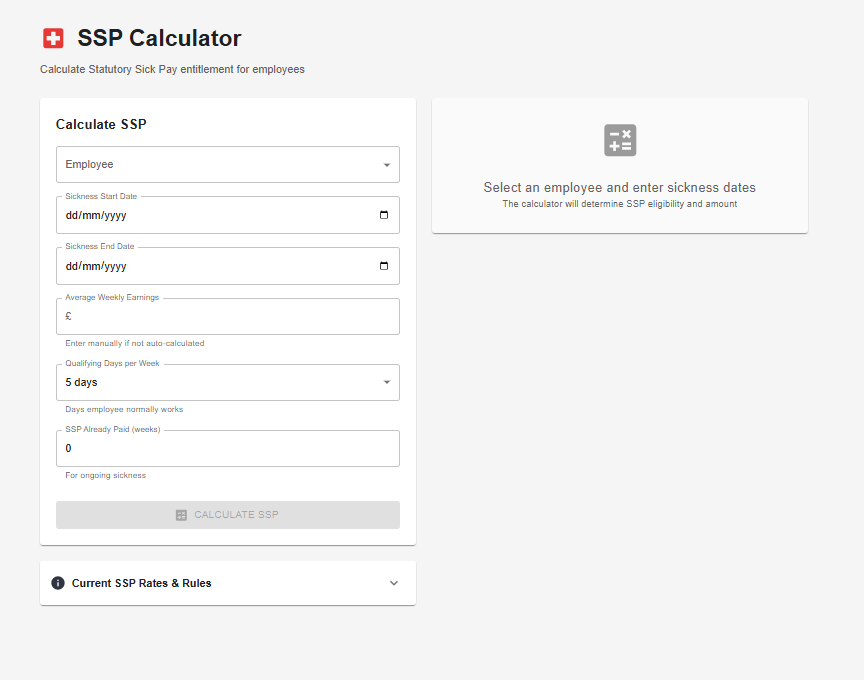
SSP Calculator — select an employee and enter sickness dates to calculate entitlement
Select the employee and their sickness start and end dates. Average Weekly Earnings can be entered manually if it isn't auto-calculated, Qualifying Days per Week defaults to the days the employee normally works, and SSP Already Paid (Weeks) accounts for an ongoing sickness that's already had some SSP paid against it.